

How can I add Drivers to a group?
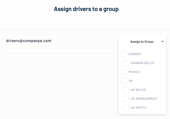
If groups (e.g. based on geography, business unit or other classification) have already been defined for your Drivers, you will need to assign each Driver to a group at the point of invitation by pushing “Assign to Group” and selecting the relevant group from the drop-down list. This is part of the invitation process.
Note that you will only be able to assign Drivers to groups for which you have access permissions.
If you feel that you should have access permissions for groups that you do not see in the list, or you would like to add a new group or sub-group, please contact your usual 5Keys Engage contact point or email support@smith-system.com.
If no groups have been defined for your Drivers, you can continue to invite your Drivers without assigning them to a group.
If no groups have been defined for your Drivers, you can continue to invite your Drivers without assigning them to a group.