
- How do I invite Drivers to download the 5Keys Engage Driver App?
- How can I add Drivers to a group?
- How can I see which Drivers have signed up?
- What do I do if Drivers are not signing up to the Driver App?
- What if my Drivers do not have company email addresses?
- What if my Drivers are not able to download apps from the Play Store or App Store?
- What are the technical requirements for a driver to be able to download and use the 5Keys Engage Driver App?
- What can I expect my Drivers to experience in their first weeks of using the Driver App?
How do I invite Drivers to download the 5Keys Engage Driver App?
In the Manager Portal, press on the "Drivers" tab.

Then press on the "Invite Drivers" button.

Press "Invite manually" to type in the email addresses of the Drivers you would like to invite, separating each address with a comma: ", "
Invited Drivers will receive an email from 5Keys Engage with the subject line " [Your Name] has invited you to join 5Keys Engage. It will only take 2 minutes to get started."
This email will contain step-by-step instructions for Drivers to download the 5Keys Engage Driver App.
How can I add Drivers to a group?
If groups (e.g. based on geography, business unit or other classification) have already been defined for your Drivers, you will need to assign each Driver to a group at the point of invitation by pushing "Assign to Group" and selecting the relevant group from the drop down list.
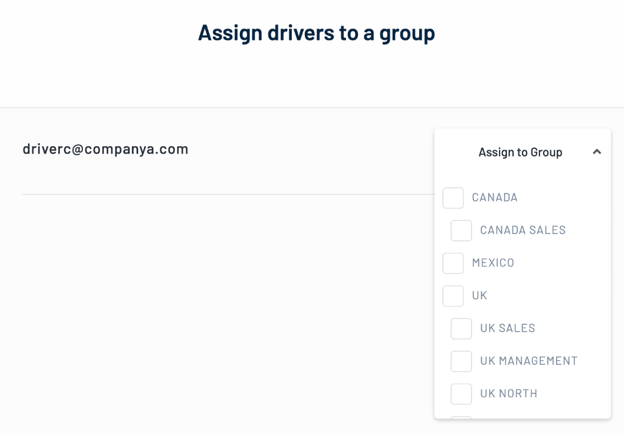
Note that you will only be able to assign Drivers to groups for which you have access permissions.
If you feel that you should have access permissions for groups that you do not see in the list, or you would like to add a new group or sub-group, please contact your usual 5Keys Engage contact point or email support@smith-system.com.
If no groups have been defined for your Drivers, you can continue to invite your Drivers without assigning them to a group.
How can I see which Drivers have signed up?
The "Drivers" section of the Manager Portal allows you to see which Drivers have signed up, and manage your Driver estate including sending download reminder emails and archiving Drivers who you no longer want to have access to the Driver App.
For more information see How to manage your driver list.
What do I do if Drivers are not signing up to the Driver App?
If none of the Drivers that you have invited are signing up to the Driver App, it could be that the invitation emails are not being delivered or are being filtered as spam. This should not happen, but if you believe it to be a possibility please check with one or two of the invited Drivers via an alternative method (e.g. company email). If Drivers are indeed not receiving download invitations, please contact your usual 5Keys Engage contact point or email support@smith-system.com.
Otherwise, you may want to consider the following steps:
-
Sending a download reminder email with a personalised message (see How to manage your driver list.)
-
Mandating sign-up as a corporate policy (if not already the case)
-
Appealing to senior corporate sponsors and/or line managers to encourage signups
What if my Drivers do not have company email addresses?
5Keys Engage requires a unique identifier for each Driver and that is the primary usage of each Driver's email address.
Where Drivers do not have company email addresses (e.g. contractors), an alternative unique identifier can be used (e.g. their personal email address).
To set this up, please contact your usual 5Keys Engage contact point or email support@smith-system.com
What if my Drivers are not able to download apps from the Play Store or App Store?
An alternative to Drivers downloading direct from the Play Store or App Store is to provision the devices directly using existing third party Mobile Device Management solutions or via an apk.
To set this up, please contact your usual 5Keys Engage contact point or email support@smith-system.com
What are the technical requirements for a driver to be able to download and use the 5Keys Engage Driver App?
Driver Device requirements:
-
Android Smartphone or Tablet (with Cellular) with Android Version v4.4 or newer (2014 or newer device); OR Apple iPhone or iPad (with Cellular) with iOS v12 or newer (2014 or newer device);
-
SIM with Data Connectivity (3G or above) - Note that trips will be recorded without mobile data but full analysis/driver experience requires periodic data connection.
-
Data plan that can accommodate an additional ~30Mb of data usage per month for 5Keys Engage.
-
150Mb of available free phone storage is recommended
Guidelines for best results:
-
The driver's smartphone needs to be switched on.
-
The driver must be logged into the 5Keys Engage app.
-
GPS / location data must be enabled.
-
5Keys Engage will work wherever the smartphone is located in the vehicle during a trip
-
The phone does not need to be mounted in a hands-free kit
-
For best results drivers should avoid leaving their phone under large objects that would obstruct GPS signals (e.g. laptops)
-
5Keys Engage is designed to minimise battery usage but there is increased usage during journeys - 5Keys Engage recommends that high mileage drivers charge their phone whilst driving.
-
Drivers do not need to start/stop 5Keys Engage - trips are automatically detected.
What can I expect my Drivers to experience in their first weeks of using the Driver App?
-
Driver may receive a "pre-onboarding email" from Manager (optional).
-
Driver receives email invite to 5Keys Engage with instructions on how to download the Driver App and register.
-
Driver completes sign up (including required permissions).
-
Early trophies are available for certain tasks and to encourage first engagement, e.g.:
-
First trip recorded
-
Driver profile complete
-
Vehicle profile complete
-
First trip classified
-